Online Journal Management System

  • Online Submission System
  • Editorial Control Panel
  • Online Review System
  • Online Publishing Tools
×

Instructions for Authors

Submit a New paper

To submit your manuscript, please use our submission interface to upload the file and enter the required contact details. You will be asked to enter the full abstract in plain text format, which helps our reviewers determine whether the topic aligns with their area of expertise.

Track Submission / Get Updates

After submission, you will receive a unique manuscript ID and password. These credentials will allow you to:

Check the status of your submission.

View reviewer comments and editorial decisions (once available).

Communicate with the editorial office during the review process.

Submit Manuscript

Confmeets is a scholarly publisher committed to advancing scientific research through streamlined digital publishing. Leveraging modern online technologies, we provide an intuitive editorial tracking system for seamless manuscript submission, review, and publication. Authors can easily upload their research papers and track progress in real time from initial submission to final publication. The platform keeps you informed with real-time progress updates throughout every step.. Editors, reviewers, and publishers also have secure access to manage peer reviews, revisions, and editorial decisions efficiently. Confmeets is dedicated to providing a transparent, accessible, and user-friendly experience for the entire academic publishing community.
Journal

Author Details

Manuscript Details

Note: Please upload ( pdf/docs ) file only (Max File Size is 5 MB)

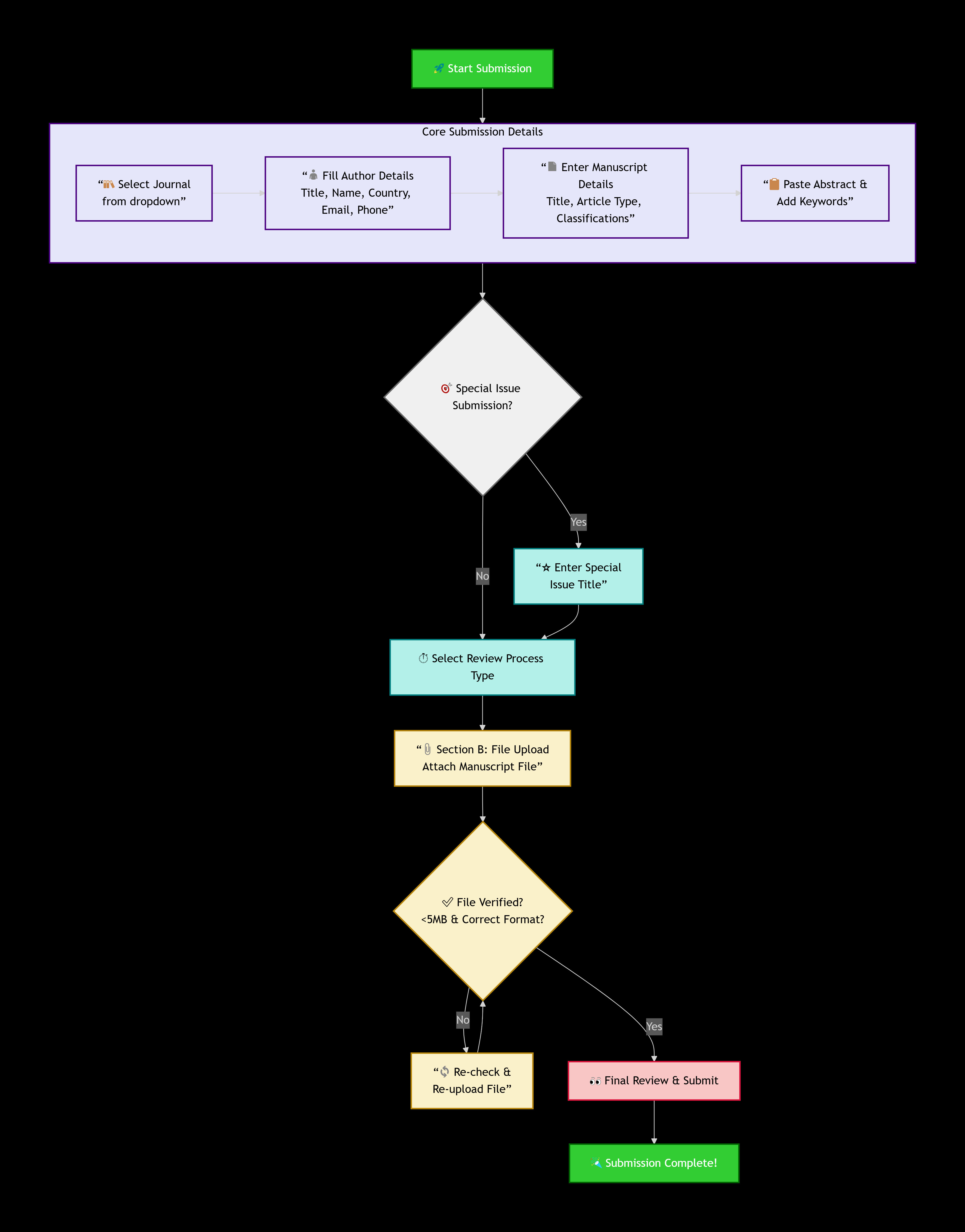
Submit Manuscript Flowchart and Process

Submission Flowchart

Manuscript Submission Documentation

Overview

This document provides complete, step-by-step guidance for submitting a manuscript through the Confmeets Online Manuscript Submission Portal. It covers every field in the submission form, the required information, preparation steps, and an example of a properly filled submission.


Step-by-Step Field Guide to the Submission Form

The form is typically divided into several logical sections. Here is a detailed description of each field you are likely to encounter.

Section A: Manuscript Type & Core Information
Journal Selection
  • Dropdown list of all Confmeets journals.
  • Select the appropriate journal for your submission.
Author Details
  • Title: Select academic/professional title (Mr, Ms, Dr, Prof, Assist Prof, Assoc Prof, etc.)
  • First Name: Enter the first name of the corresponding author (Required)
  • Last Name: Enter the last name/surname of the corresponding author
  • Country: Select your country from the list.
  • Email: Provide a valid and active email address.
  • Phone Number: Enter a reachable phone number.
Manuscript Details
  • Title: Full manuscript title exactly as it appears in your paper.
  • Article TypeChoose article category- Research Article, Review Article, Short Communication, Editorial, Case Report, Opinion, Commentary, Special Issue Article, etc.
  • Issue Type: Regular Issue or Special Issue.
  • Special Issue Title: If submitting to a special issue, enter its designated title
  • Classifications: Choose the relevant subject area (Toxicology, Genetics, Forensic Psychology, Digital Forensics, etc.).
  • Suggest Classification: Use this if your manuscript topic does not match the available list
  • Abstract: Paste the full abstract in plain text. No special formatting needed
  • Keywords: Enter 3-6 keywords separated by commas.
  • Review Process Type: Regular Review or Fast Editorial Review (10 days).
  • Attach File: Upload your manuscript file (PDF, DOC, or DOCX). Maximum file size: 5 MB.
Note:

After your manuscript is submitted, it will undergo a preliminary quality check, followed by the initiation of the editorial review process.

For further details, please refer to our Editorial Process:

arrow_upward arrow_upward